Account Settings
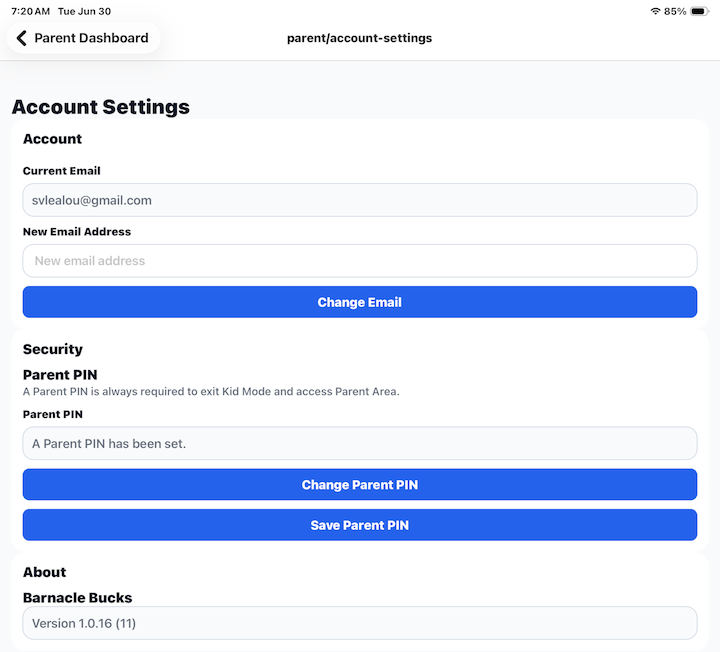
The Account Settings screen allows you to manage your Barnacle Bucks account and security preferences.
From this screen you can update your email address, manage your Parent PIN, and view the version of Barnacle Bucks currently installed on your device.
Email Address
Your current email address is displayed at the top of the screen.
To change your email address:
- Enter your new email address.
- Tap Change Email.
You may be asked to verify your new email address before the change takes effect.
Parent PIN
Your Parent PIN helps protect access to the Parent Area.
When a Parent PIN has been configured, it is required whenever someone exits Child Mode and returns to the Parent Area.
If a Parent PIN has already been created, the app displays a confirmation message instead of showing the PIN itself.
Change Parent PIN
Tap Change Parent PIN to create a new Parent PIN or replace your existing one.
Choose a PIN that is easy for you to remember but difficult for children to guess.
Tap Save Parent PIN to save your changes.
About
The About section displays the version of Barnacle Bucks currently installed on your device.
This information can be helpful when contacting support or confirming that you are using the latest version of the app.
Tips
- Keep your email address up to date so you can receive important account notifications.
- Do not share your Parent PIN with children.
- Use a Parent PIN that is different from any Child PIN.
- Include the app version when reporting a problem or requesting support.