Screen Time
Barnacle Bucks provides two Screen Time pages for parents.
- Screen Time lets you restore unused screen time when a child ends a screen time session early.
- Activity provides a history of your children's screen time sessions and restoration activity.
If a child redeems more minutes than they use, the unused minutes can be returned to their available balance with a single tap.
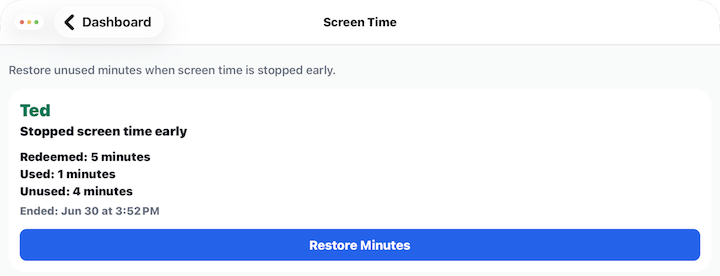
Restoring Screen Time
Each completed session that still has unused minutes appears on this screen.
For each session you'll see:
- The child's name.
- The number of minutes redeemed.
- The number of minutes used.
- The number of unused minutes available to restore.
- When the screen time session ended.
Restore Minutes
Tap Restore Minutes to return all unused minutes to the child's available screen time balance.
Once the minutes have been restored:
- The child's available screen time balance is immediately updated.
- The restored session is removed from this screen.
- The restored minutes can be redeemed again later.
Each screen time session can only be restored once.
Viewing Screen Time Activity
The Activity screen displays a history of your children's screen time sessions.
Use this page to review previous screen time sessions for each child, including when a session:
- Started
- Ended normally
- Was stopped early by the child
- Expired
- Had unused minutes restored
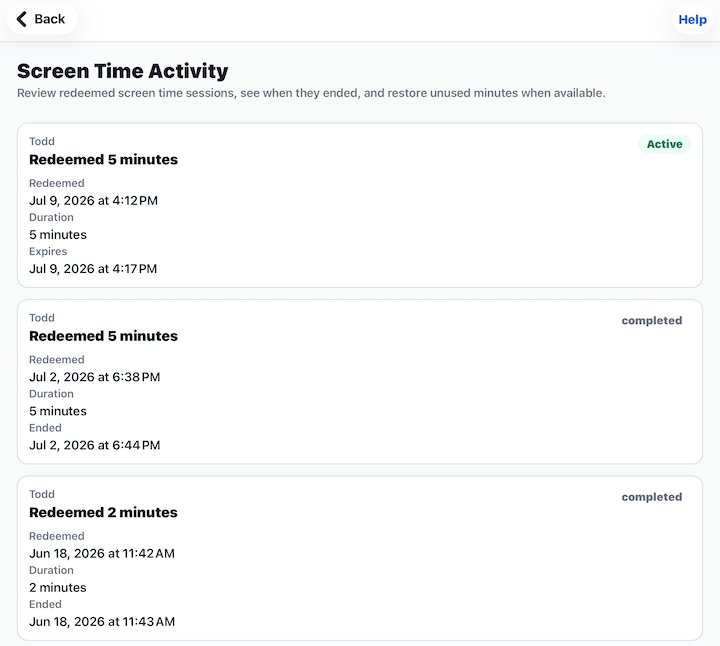
For each activity entry you'll see:
- The child's name.
- The session status.
- When the session started.
- When the session ended.
- The number of minutes redeemed.
- The number of minutes used.
- Whether any unused minutes were restored.
The Activity page is a read-only history and cannot be edited.
Tips
- Restore minutes when a child finishes using a device before all redeemed time has been used.
- The Activity page provides a historical record of screen time sessions and restorations.
- Review the redeemed, used, and unused minutes before restoring a session.
- If no sessions appear on the Screen Time page, there are currently no unused minutes available to restore.